What is Loan Repayment?

The Loan Repayment category under Bharat Connect enables customers to conveniently repay various types of loans through a unified and secure digital platform. This category supports repayment for multiple loan products offered by banks, NBFCs, and MFIs.
Customers can make repayments using multiple payment modes such as UPI, debit card, net banking, wallets, or cash (through Bharat Connect agents). The system provides real-time confirmation, enhanced reconciliation, and a standardized payment experience across channels.

Supported loan types includes

  • Personal Loans

  • Home Loans

  • Vehicle Loans

  • Gold Loans

  • Consumer Durable Loans

  • Microfinance Loans (MFI)

  • Educational Loans

  • Loan Against Property

Key Features

  • Seamless and interoperable repayment across Bharat Connect-enabled channels

  • Instant payment acknowledgment and status updates

  • Secure transaction processing with robust reconciliation

  • Availability across offline and online touchpoints

  • Standardized customer experience with fetch/payment workflow were supported

Check out this video to pay your EMIs

/

/

/

/
Simplified user journey
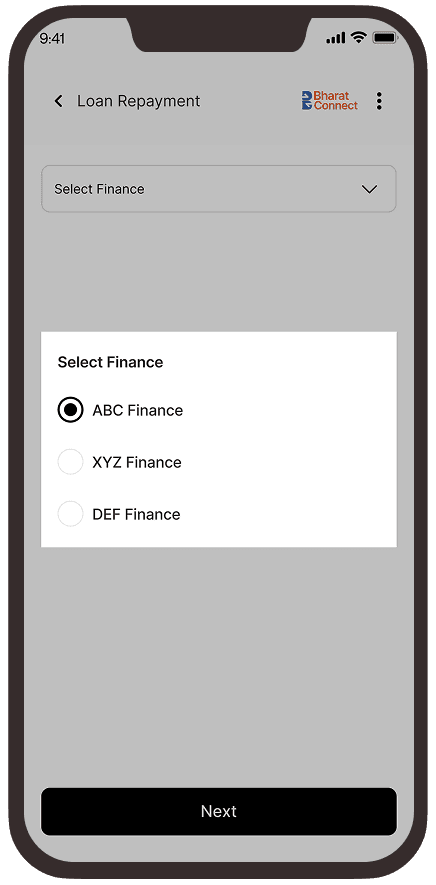
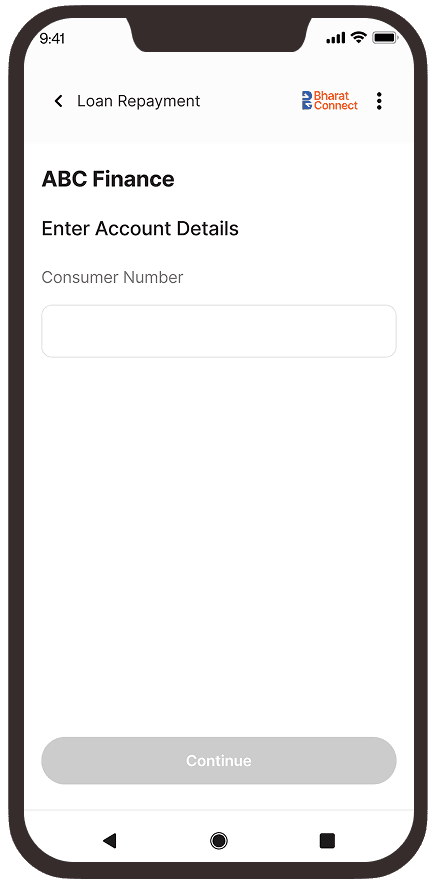
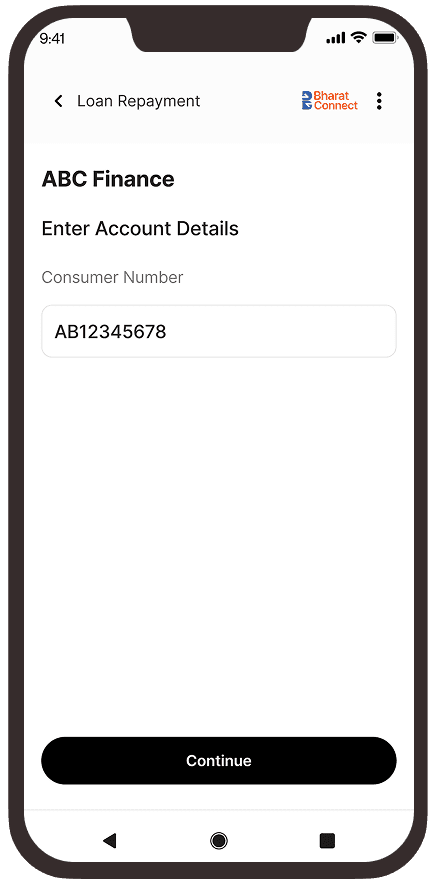
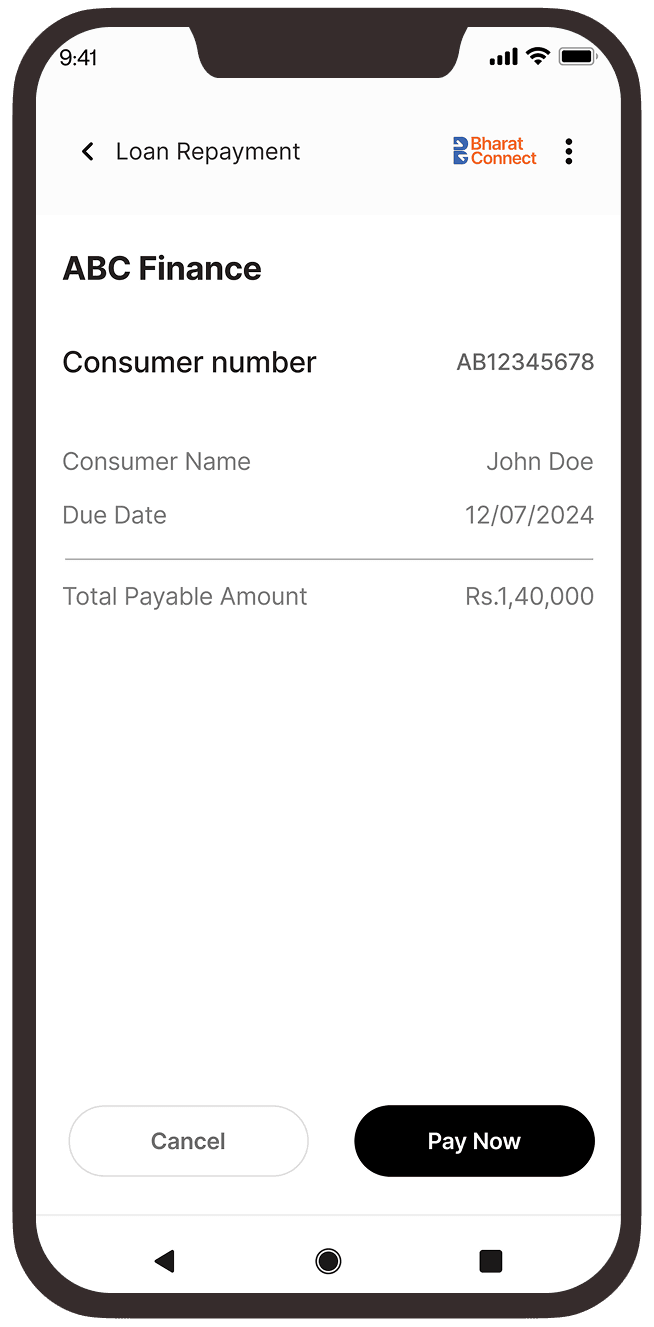
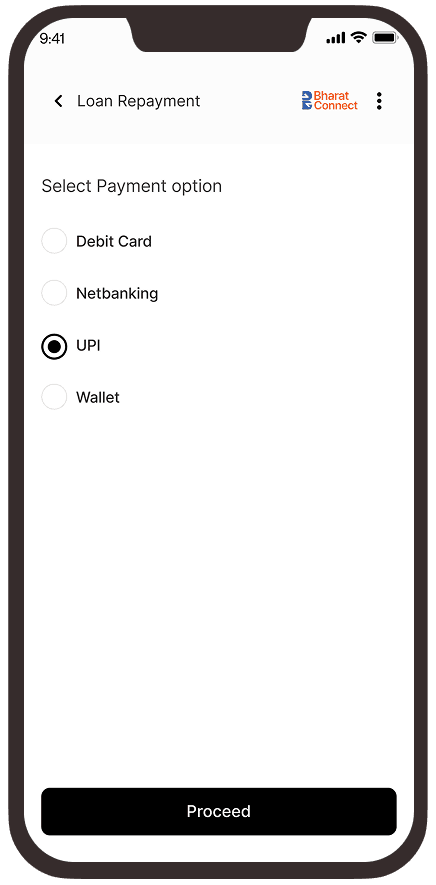
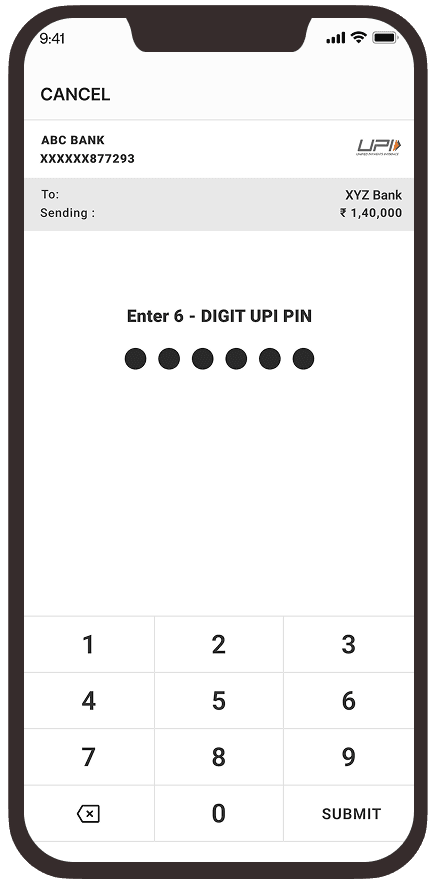
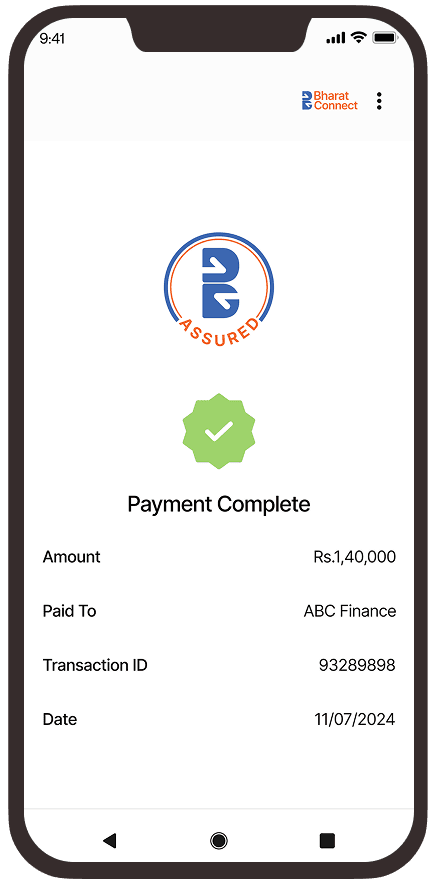
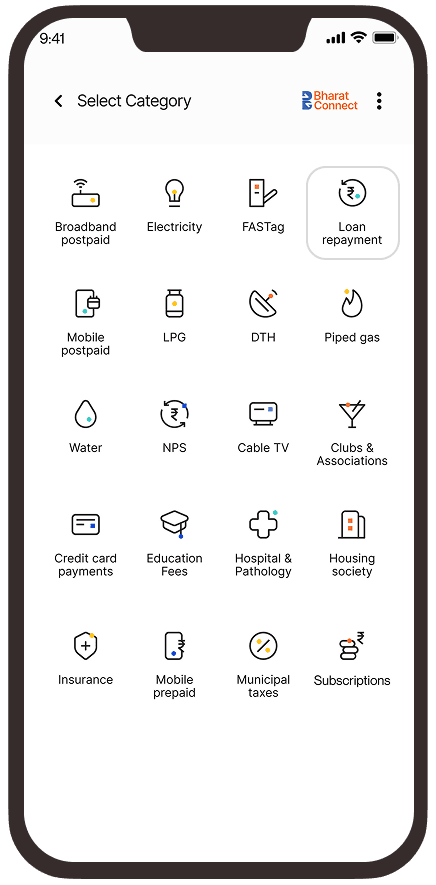
Loan Repayment category selected on the Bharat Connect bill payment app category screen. Loan Repayment screen showing finance partner selection options with ABC Finance selected. Loan repayment account details screen for ABC Finance with a field to enter the consumer number. Loan repayment account details screen with consumer number entered and Continue button enabled. Loan repayment summary screen displaying consumer number, customer name, due date, payable amount, and Pay Now button. Loan repayment payment options screen with UPI selected as the payment method and Proceed button. UPI payment authorization screen prompting the user to enter a 6-digit UPI PIN to complete the loan repayment transaction. Loan repayment success screen displaying payment completion confirmation, transaction ID, amount paid, beneficiary details, and payment date.
  1. Click on the “loan repayment” category within your preferred payment app

  2. Select your finance partner and tap ‘Next’ to move ahead

  3. Provide your account details, starting with your Consumer Number

  4. Input your Consumer Number and tap “Continue” to proceed

  5. Verify your loan information and tap “Pay Now” to continue

  6. Select your payment option and tap “Proceed” to move ahead

  7. Enter your 6-digit UPI PIN to authorize and complete the payment transaction

  8. Get instant confirmation, along with transaction details 

  1. Click on the “loan repayment” category within your preferred payment app

  2. Select your finance partner and tap ‘Next’ to move ahead

  3. Provide your account details, starting with your Consumer Number

  4. Input your Consumer Number and tap “Continue” to proceed

  5. Verify your loan information and tap “Pay Now” to continue

  6. Select your payment option and tap “Proceed” to move ahead

  7. Enter your 6-digit UPI PIN to authorize and complete the payment transaction

  8. Get instant confirmation, along with transaction details 

Growth catalysts for this category

Enhanced API

With Bharat Connect

  • Payment via single API
  • Multiple payment modes
  • Reduced service load for billers

Without Bharat Connect

  • Multiple PG integrations
  • Manual Recon

Agent Collection

With Bharat Connect

  • Open outlets throughout the day
  • Access to 7lac+ agent outlets
  • Secure cash handling

Without Bharat Connect

  • Closed bank branches
  • Separate vendor agreements
  • Cash management hassles

ClickPay

With Bharat Connect

  • No added cost for URL generation
  • Support all payment modes
  • Ease of URL generation

Without Bharat Connect

  • Costs per URL
  • Supports only one payment mode
  • Monthly URL generation

Bharat Connect QR

With Bharat Connect

  • QR generation one-time
  • Support all payment modes
  • Real-time bill fetch

Without Bharat Connect

  • Monthly QR generation
  • Support one payment mode
  • No real-time bill fetch

Frequently asked questions

The Loan Repayment category allows customers to repay loan emis issued by banks, NBFCs and MFIs through the Bharat Connect ecosystem using various digital and offline channels.

Customers can repay multiple loan types including personal loans, home loans, vehicle loans, SME loans, gold loans, consumer durable loans, and microfinance loans.

Customers can use the loan account number or some other parameter to fetch loan details and then complete the repayment using preferred payment modes.

Bharat Connect supports UPI, debit card, net banking, wallet, and cash payments at Bharat Connect agent outlets.

Yes. Bharat Connect provides instant, system-generated payment confirmation via SMS or the channel through which the payment was made.

Partial payments are permitted only if the biller supports partial repayment through Bharat Connect. Otherwise, full EMI or installment amount needs to be paid.

Advance EMI payments are allowed if the biller has enabled this option in Bharat Connect.

Yes, overdue amounts can be paid if the biller supports overdue and penalty amounts in the fetch response.

Bharat Connect ensures automated and standardized reconciliation. Settlement happens via NBBL to BOU.

Foreclosure or lump-sum closure payment is allowed only if the lender has enabled it through Bharat Connect.

Customers can repay loans only for those lenders who are onboarded as Bharat Connect billers.

Customer charges depend on the payment channel and the biller’s configuration.

Yes. Customers can visit Bharat Connect-enabled retail agent outlets to repay loans using cash, UPI, or card.

Bharat Connect follows stringent security, compliance, and settlement standards, ensuring safe and reliable repayment transactions.